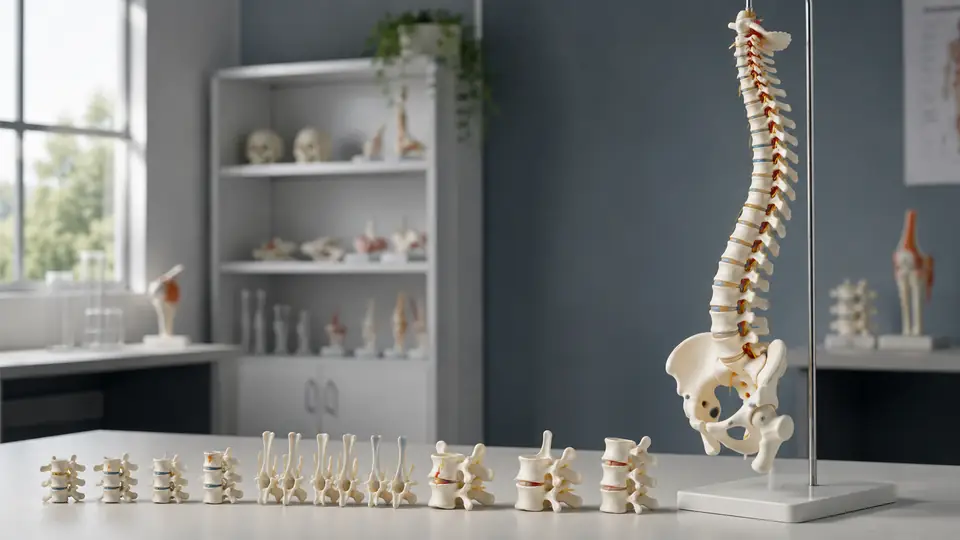
Studying the spine from a flat diagram can leave an important question unanswered: how do the vertebrae actually fit together in three dimensions? A spine model gives you that missing perspective. You can follow the column from the cervical region in the neck to the thoracic and lumbar regions, rotate it to inspect the posterior side, and compare the changing shapes of neighboring vertebrae instead of memorizing isolated labels.
The most effective way to learn is not simply to read the names printed on the model. Use the model as a tool for observation, identification, movement, and self-testing. A short study session might begin with locating the spinous processes, move to distinguishing cervical from lumbar vertebrae, and finish with the model turned away while you identify structures from touch or memory. That sequence turns a plastic or resin object into a three-dimensional anatomy lesson.
What You Can Study With a Spine Model
A typical human spine model represents the vertebral column from the neck to the sacrum, and some models also include the coccyx, pelvis, intervertebral discs, spinal nerves, or major ligaments. The exact construction varies, so first inspect how the model is assembled. A flexible model may show curvature and movement, while a rigid model may emphasize alignment and surface anatomy.
Begin by separating the spine into its major regions. The cervical spine contains seven vertebrae, the thoracic spine contains twelve, and the lumbar spine contains five. Below the lumbar region is the sacrum, which is formed from fused sacral vertebrae, followed by the coccyx. If a model uses color coding, treat the colors as visual aids rather than as anatomical structures themselves, because manufacturers may use different schemes.
Next, examine the structures repeated along the column. Each typical vertebra includes a vertebral body toward the front, or anterior side, and a vertebral arch toward the back, or posterior side. The opening enclosed by the body and arch is the vertebral foramen. When the vertebrae are stacked, these openings form the vertebral canal, the passage that contains the spinal cord in the living body. That continuous tunnel is often the first feature that becomes obvious on a model.
Learn Orientation Before Memorizing Names
Hold the model so the vertebral bodies face forward and the spinous processes point backward. The spinous processes are the prominent projections that can be felt along the midline of the back, while the transverse processes extend laterally from the vertebral arch. If the model is on a stand, check whether the stand or mounting hardware changes your view of the anterior and posterior sides.
A useful practice is to rotate the model slowly and narrate what you see. From the side, identify the vertebral bodies and the curves of the spine. From behind, trace the spinous processes down the midline. From above, look through the vertebral foramen and locate the paired transverse processes. A student who can describe the same vertebra from several angles is building spatial understanding rather than relying on one familiar picture.
Study the Spine From Large Regions to Individual Vertebrae
Do not begin by trying to identify every small projection at once. First learn the regional pattern. The cervical vertebrae are generally smaller and support the neck. Thoracic vertebrae articulate with ribs, and lumbar vertebrae have large, sturdy bodies suited to the lower back. These broad differences provide useful orientation before you study exceptions and detailed landmarks.
| Region | Typical Features to Observe | Useful Study Question |
|---|---|---|
| Cervical | Smaller vertebral bodies, transverse foramina in typical cervical vertebrae, often bifid spinous processes in mid-cervical levels | What features suggest that this vertebra belongs to the neck? |
| Thoracic | Rib-related articular surfaces, relatively long and inferiorly angled spinous processes in many typical examples | Where would a rib connect to this vertebra? |
| Lumbar | Large vertebral bodies, broad processes, and a more robust overall appearance | What makes this vertebra look adapted to the lower back? |
| Sacral | Fused segments, broad triangular shape, anterior and posterior sacral foramina | Which features show that these vertebrae are fused? |
Use this table as a prompt sheet, not as a substitute for looking at the model. For example, a small vertebra with holes in its transverse processes may suggest the cervical region, while a large blocklike vertebra with a thick body points toward the lumbar region. The shape gives you a starting hypothesis, and the landmarks help you confirm it.
Compare Neighboring Regions Side by Side
Many learners remember categories better when they compare two regions directly. Place a cervical and lumbar vertebra next to each other, if the model allows removal, or compare the upper and lower ends of the mounted column. Notice the dramatic change in vertebral body size, the angle and shape of the spinous process, and the overall width of the vertebral arch.
A second comparison can focus on thoracic and lumbar vertebrae. Ask why the thoracic model includes surfaces associated with rib articulation, while the lumbar model does not show the same rib-related arrangement. Even when the model does not include removable ribs, the facets or smooth articular areas on the thoracic vertebrae provide clues. Comparison turns a list of regional features into a visual pattern.
Use a Consistent Vertebra Identification Routine
When a model includes individual removable vertebrae, use the same inspection order each time. Consistency prevents you from jumping straight to the feature you happen to remember and overlooking orientation. A practical routine is to identify the region, orient the vertebra, locate the body and foramen, trace the arch, and then examine the processes and articular surfaces.
- Identify the likely region. Look at size, shape, and any distinctive openings or rib-related surfaces.
- Find the vertebral body. This broad anterior portion is usually the easiest landmark for establishing direction.
- Locate the vertebral foramen. Observe its shape and how it relates to the body and arch.
- Trace the vertebral arch. Follow the pedicles and laminae where the model displays them clearly.
- Inspect the processes. Identify the spinous, transverse, and superior or inferior articular processes.
- State your answer aloud. Explain why the vertebra belongs to a region instead of naming it without evidence.
Suppose you are handed an unidentified vertebra during a practical study session. Rather than blurting out “lumbar,” describe the large body, broad posterior elements, and lack of typical cervical or thoracic clues. That explanation reveals whether you understand the anatomy or have merely recognized a silhouette, and the distinction matters when the specimen is rotated.
Pay Attention to Landmark Names
The vertebral body forms the anterior weight-bearing portion. The pedicles extend backward from the body and help form the sides of the vertebral arch. The laminae complete much of the posterior arch, while the spinous and transverse processes project from it. Articular processes bear facets that help neighboring vertebrae form facet joints.
Terminology becomes easier when you connect each word to a location. “Spinous” should bring your attention to the single posterior projection, while “transverse” should direct you toward the paired lateral projections. On a model, trace each structure with a finger and then find the same structure on the next vertebra. Repetition across levels helps the words become spatial labels rather than vocabulary-card definitions.
Practice Active Recall With the Model Turned Away
Reading labels creates familiarity, but familiarity is not the same as retrieval. After studying a region, turn the labeled side away or cover the labels with removable markers that will not damage the model. Point to a structure and name it before checking the answer. If you cannot identify it, look briefly, turn away again, and repeat the attempt.
Use several types of prompts. Ask, “What is this projection?” when pointing to a process. Ask, “Which direction is anterior?” when rotating the model. Ask, “What would this opening contribute to when the vertebrae are stacked?” when indicating a vertebral foramen. These questions require you to connect position, structure, and function without turning the study session into a passive labeling exercise.
A simple two-column study sheet can support the process. On one side, write prompts such as “thoracic vertebra, posterior view” or “structure forming the anterior portion.” On the other side, record your answer and a brief reason. The spine model supplies the three-dimensional reference, while the paper records which distinctions still need attention.
Use Touch Carefully, Not as a Guessing Game
Touch can reinforce spatial memory when the model is durable and the parts are securely attached. With your eyes closed, locate the midline spinous process, move laterally to a transverse process, and then identify the opening within the vertebral arch. This is especially useful after visual study because it asks you to recognize a structure by position and shape.
Do not force small detachable components or twist joints beyond their intended movement. Some spine models use flexible connectors, metal springs, elastic cords, magnets, or small pegs, and the manufacturer’s care instructions should take priority. If the model is fragile or heavily labeled, use touch lightly and rely on rotation for most orientation practice.
Study Spinal Curves and Movement Without Overreading the Model
A mounted spine model can show the broad arrangement of the cervical, thoracic, and lumbar curves. Observe the column from the side rather than from the front, then compare how the curves change from the neck through the lower back. A flexible model may also demonstrate how the vertebral column bends, but its movement is an educational approximation, not a complete representation of living joints, muscles, discs, and ligaments.
Try a basic movement demonstration by viewing the model in neutral alignment and then observing the permitted flexion, extension, or lateral bending. Note which parts move together and which remain relatively stable. If the model includes intervertebral discs, watch how the spaces between vertebral bodies change visually during movement, while remembering that a model cannot reproduce the full mechanical behavior of biological tissue.
Two study partners can make this exercise more active. One person slowly changes the model’s position, while the other identifies the direction of movement and names the spinal region most visibly involved. Then switch roles and correct terminology using an atlas or course reference. The goal is to connect orientation with language, not to use the model as a clinical movement assessment.
Combine the Spine Model With Other Learning Resources
A physical model is strongest at showing relationships that are difficult to grasp in a flat image, including the continuity of the vertebral canal and the changing orientation of processes. An anatomy atlas can add detailed views of individual vertebrae, while a digital model may provide labels, rotation, sectional views, or animation. Use each resource for the feature it presents most clearly.
For example, inspect the model to locate a thoracic vertebra, consult an atlas to confirm the rib-related articular surfaces, and return to the model to find the same areas in three dimensions. If a digital resource uses a slightly different color scheme or orientation, focus on the structure’s location and relationships rather than memorizing its color. This cross-checking is particularly useful because spine models vary in how much detail they include.
Radiographs, diagrams, and clinical images may show the vertebral column in a different orientation from the model. That difference is not necessarily an error. Compare the image with the model using fixed landmarks such as the vertebral body, spinous process, sacrum, and pelvic connection. When a structure is difficult to match, first check whether you are viewing the anterior, posterior, or lateral side.
Common Problems When Studying Vertebrae With a Model
Relying on Color Alone
Color coding can separate regions quickly, but it is not a universal anatomical convention. A cervical vertebra colored blue on one model may appear white or green on another. Train yourself to identify the vertebra from morphology and position first, then use color as confirmation.
Confusing the Front and Back
The vertebral body is anterior, while the spinous process is posterior. This seems simple until the model is upside down or viewed from an unfamiliar angle. Establish orientation every time by locating the body and posterior midline process before naming smaller landmarks.
Memorizing Isolated Labels
Knowing that a structure is called a pedicle is less useful if you cannot locate it between the vertebral body and the rest of the arch. Trace the structure, describe its neighbors, and compare it with the same feature on another vertebra. Relationships provide a stronger anchor than a label floating beside a line.
Assuming Every Model Shows Every Detail
Some models simplify the vertebral arch, omit small foramina, or use a single piece for several fused sacral segments. Do not conclude that an unrepresented feature is absent from human anatomy. Check the model’s labeling guide or construction notes, then use an atlas for details the model does not display.
Care, Storage, and Study Setup
Keep the model on a stable surface where the stand, flexible joints, and removable parts will not be pulled by nearby books or bags. Store loose components together in a labeled container, especially if the model includes separate vertebrae or ribs. A missing connector can turn a useful demonstration into a frustrating assembly puzzle.
For cleaning, follow the manufacturer’s instructions because plastics, painted surfaces, printed labels, adhesives, magnets, and elastic components do not all tolerate the same products. In the absence of specific guidance, use gentle handling and avoid soaking, abrasive cleaners, and unverified solvents. Wipe dust carefully rather than scrubbing printed anatomical markings away.
Set up the model beside your notes, an atlas, and a light source that reveals the posterior arch without casting deep shadows. A clear workspace also makes it easier to rotate the model and compare two views. Ten focused minutes of identification practice can be more useful than an hour spent passively rereading labels.
Frequently Asked Questions
What Should I Learn First on a Spine Model?
Start with orientation and the major regions. Learn to distinguish anterior from posterior, locate the vertebral body and spinous process, and recognize cervical, thoracic, lumbar, and sacral patterns before studying smaller landmarks.
Can a Spine Model Show Every Vertebral Difference?
No. Models simplify anatomy to remain durable, visible, and teachable. They may not show every variation between individual vertebral levels, and features such as small foramina or joint surfaces may be reduced. Use an atlas or course reference when the model lacks the detail you need.
Is a Flexible Spine Model Better for Studying?
Flexibility is useful for observing general spinal curves and permitted movement, while a rigid model may provide steadier views of surfaces and alignment. Neither design automatically replaces the other. The more useful format depends on whether your immediate goal is movement, orientation, regional comparison, or detailed landmark identification.
How Can I Test Myself Without Looking at the Labels?
Turn the model away from its labels, point to structures, and identify them aloud. Ask yourself where the structure is, which region it belongs to, and what neighboring structures confirm your answer. Then check the label or atlas and repeat missed items.
Make the Model a Three-Dimensional Question
The most productive study session treats every part of the spine model as a question. Which way is anterior? What distinguishes this vertebra from the one above it? How does the opening align with the next vertebra? Why does this region look more robust or show rib-related surfaces?
Move from regional recognition to landmark identification, then from visible labels to active recall and explanation. Rotate the model, compare neighboring vertebrae, confirm uncertain details with an atlas, and handle flexible or removable parts according to the manufacturer’s instructions. That approach helps you learn not just what each vertebra is called, but how the pieces form a continuous, organized vertebral column.
